 Cozy
CozyWarm Corner
Soft light, gentle rain, and a room full of your favorite things.
Get Warm Corner in Cozy for Mac
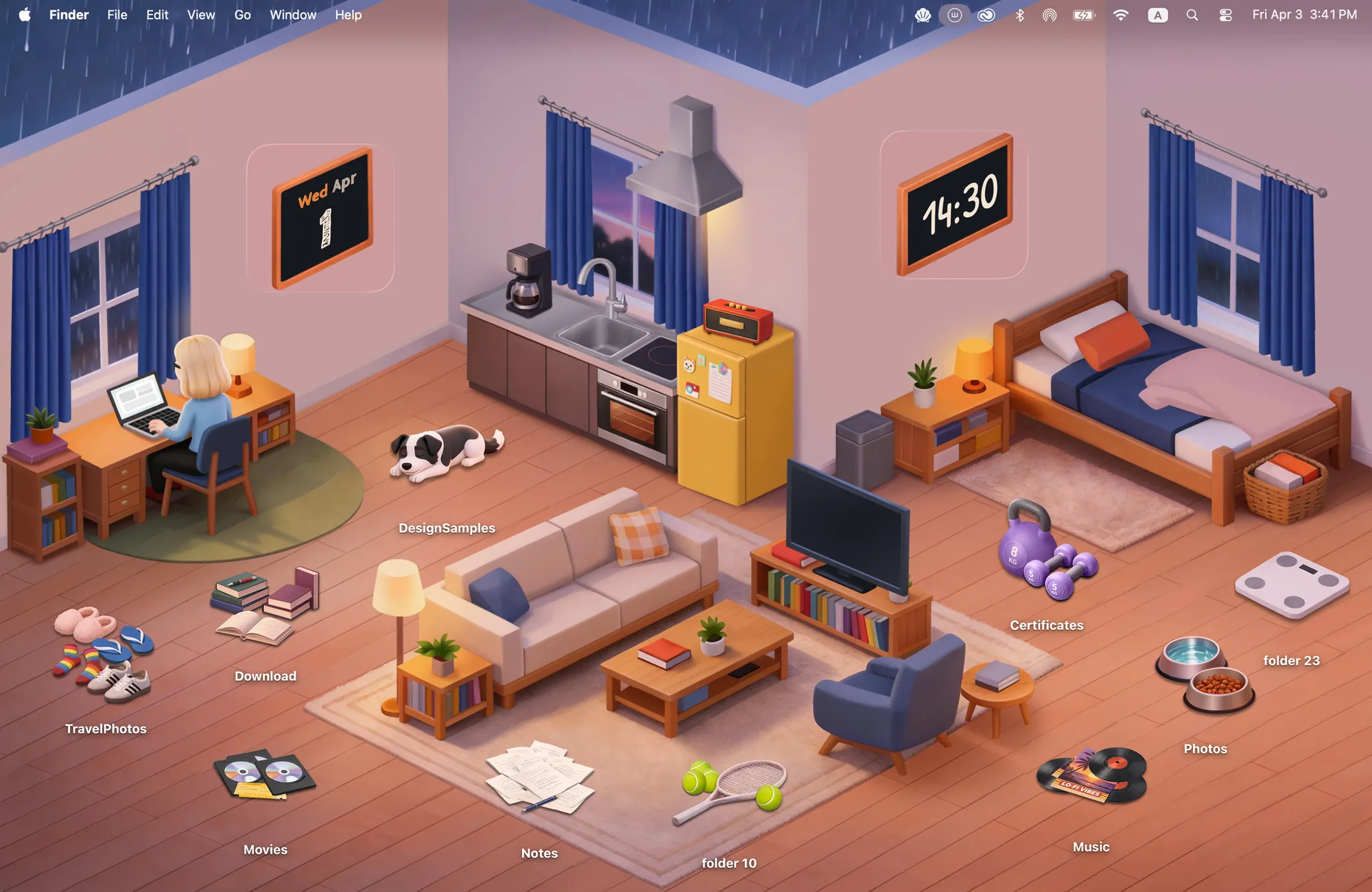
Books, records, sneakers, and a sleepy pup. Scatter your favorites around the room.
What's included
- 12 folder icons: Pets 2, Entertainment 3, Sports 3, Lifestyle 4
- Widgets: Clock & Calendar
- One wallpaper, drawn together with the icons and widgets
One space, designed together
Warm Corner is drawn as one small apartment on a rainy evening. The sofa, the desk and the kitchen live in the wallpaper, and the folder icons are the things you would scatter around a room you love: records, books, sneakers, a sleepy dog, a kettlebell. The clock and calendar hang on the wall as two little chalkboards. Put a folder by the couch or next to the bed and it simply belongs there, because every piece was drawn for this room.
Best for
- Late-night study sessions with soft light and rain outside
- Working from home when you want your desk to feel like your place
- Anyone who likes a tidy desktop that still feels lived in
How to get this look on your MacBook
- Download Cozy from the Mac App Store. It is free to try.
- Open Cozy from the menu bar and pick Warm Corner.
- Click Apply. Your desktop wallpaper and folder icons change together, and your MacBook home screen looks like the picture above. Then add the matching widgets from the widget gallery.
FAQ
Can I move the icons around the room?
Yes. Every folder icon is a drawn object, so you can drag it anywhere on your desktop, like moving things around a real room.
Which widgets come with Warm Corner?
A clock and a calendar, drawn as chalkboards that hang on the wall of the room.
Does Warm Corner work on MacBook Air, MacBook Pro and MacBook Neo?
Yes. Cozy runs on any Mac with macOS 14 or later and fits each theme to MacBook and iMac screens.
Is Warm Corner free?
Cozy is free to download with one free theme, Rainbow Felt. Warm Corner is included in the one-time unlock, along with every other theme and future ones.
Can I go back to my old folder icons?
Yes. Folder icons are a standard macOS setting, and you can restore the default icons at any time.
Get the whole look on your Mac
Cozy is free to try with Rainbow Felt. One purchase unlocks every theme, including new ones.
Download Cozy on the Mac App Store